 write.cv
Meet Octop, the write.cv coach
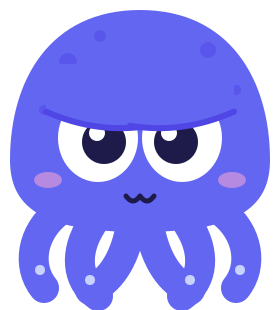
write.cv has a new face. Octop is an indigo octopus with six arms, a pen it never puts down, and opinions about your summary. From today it sits in the corner of the editor and on every page of the site.
Why an octopus
Writing a CV is six jobs at once: fill the sections, pick a template, match the job post, pass the ATS scan, export the PDF, publish the page. An octopus does several things at the same time and still looks calm about it. That is the whole idea. The pen is because the first thing Octop does is write.
We drew nine candidates before this one: four cats, a falcon, a sparkle, a fennec and a camel. The octopus won because its face reads at 16 pixels, it fits a page corner without a body, and it looks like it has seen ten thousand CVs.
What Octop does in the editor
Octop reacts to what you do. It scans while the ATS score recomputes, celebrates when the score rises, and looks unimpressed when it drops. It thinks while the AI assistant works, writes when a section is being filled, and waves when you open the app for the first time.
It also talks, briefly. A short line appears when something specific is worth fixing: an empty summary, a job with no dates, a skills section with nothing in it. Each line has a button that takes you to the fix. Close a tip once and it stays closed. There is a "Hide Octop" link if you want none of it.
What it will never do
Octop never blocks the page, never asks for your email, and never says your CV is perfect. It points at specifics: a number missing from a bullet, three keywords the job post uses that your CV does not. It does not promise interviews. Nobody can.
It also respects the reduced-motion setting of your device, stays out of the printed PDF, and does not appear on public profile pages, which belong to the person who published them.
Where else you will see it
The favicon, the app icon, the link previews when you share a page, the blog and the CV guides, and the one email we send when you publish a page. Same drawing everywhere, generated from one file, so it never drifts. Every pose can be seen at https://write.cv/mascot/octop-sheet.html.
Open the editor and say hello. If a line it says is wrong, or a pose is annoying, reply to any write.cv email. Octop reads nothing; a human does.